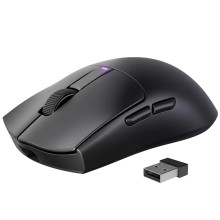
Device
Manufacturer
Model No.
PC431A
Network Technology
Interface/port(s)
FCC ID
2BK4B-PC431A
To setup the RisoPhy PC431A, you will need to select either Bluetooth or the included USB Dongle. This can be used via a USB C cable too which also charge the mouse at the same time.
RisoPhy PC431A Software
File: WIRELESS MOUSE PC431A_v1.0.1.1_2024.12.26_setup.exe
SHA-256:
a92478b025bebd72536fb01b634cad402b94005bdf8ab7e504e1b29bd2fe5717



