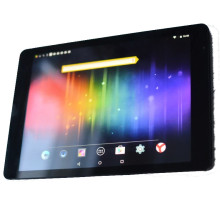
The DEXP Ursus TS197 Navis Tablet is a versatile and compact device, offering portability and functionality. With a vivid touchscreen display and Android OS/ Windows 10 on some models, it provides an intuitive user experience for browsing, multimedia, and productivity. Featuring a capable processor and sufficient RAM, it handles various apps and light tasks efficiently. Its expandable storage and connectivity options make it adaptable for diverse needs. While not a powerhouse, its affordability and balanced performance make the Ursus TS197 Navis a practical choice for casual users seeking a budget-friendly tablet for everyday use, bridging convenience and functionality in a portable package.
Minimal ADB and Fastboot Download
File: minimal_adb_fastboot_v1.4.3_setup.exe
f73fc7b98bb6b92dfefb3bc5a29a58275e648650236c8dcbff937ba1ff37de66
Minimal ADB and Fastboot Download (zip file)
File: minimal_adb_fastboot_v1.4.3_setup.zip
4de8f4997700e42d226e682cad28ddf3967780401fec697e2d2b70149e453981
To install simply download the setup.exe run the package to install in the default location (C:\Program Files (x86)\Minimal ADB and Fastboot>) after installation you will be given the chance to create a desktop icon, and then the option to use the program. To use ADB command there is a cheat sheet attached to this page.



