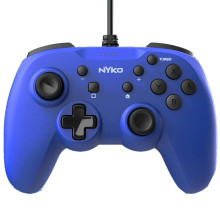
🧱 Device
🏗️ Manufacturer
#️⃣ Model No.
87306
Interface/port(s)
UPC
743840873068
ASIN
B091279LF7
Operating System(s)
The Nyko Prime Controller 87306 is advertised as compatible with Nintendo Switch, bear in mind that it has no gyroscope or NFC reader. Also if using on Switch 2 there is no 'C' button (GameChat). On PC configuration should be done on the Game Controllers in Settings.
Nyko Prime Controller 87306 Quick Setup
- Connect the Controller
Pair the controller with your Nintendo Switch or connect it to your Windows PC using USB or Bluetooth, depending on your model. - Configure on PC
On Windows, open Settings → Bluetooth & devices → Devices → Game Controllers (or joy.cpl) to verify all buttons and analog sticks are working correctly. - Start Gaming
Launch your game and configure the controller layout if the game supports custom button mapping. - Know the Limitations
The Nyko Prime Controller 87306 does not include a gyroscope or NFC reader. When used with a Nintendo Switch 2, it also lacks the dedicated C (GameChat) button, so those features are unavailable.



