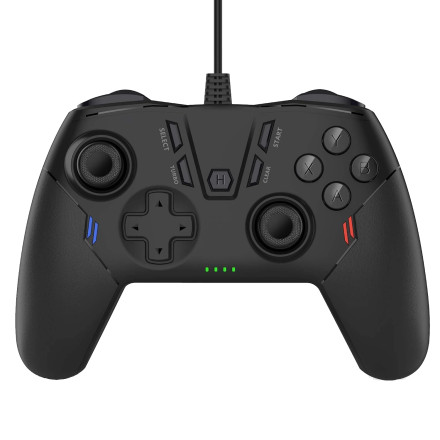
Device
Model No.
USB50
Interface/port(s)
Operating System(s)
The Uberwith USB50 is a wired game controller with dual vibration feedback, X-input and D-input support, Turbo and Clear functions, precision 3D joysticks, and a 3-meter (9.8-foot) USB cable with a magnetic interference filter. Red and blue LED lighting provides additional visual feedback during use.
Controller Features
- Dual vibration feedback for supported games
- X-input and D-input modes, with X-input as the default
- Turbo and Clear functions
- Precision 3D analog joysticks
- 3-meter (9.8-foot) USB cable with interference filter
- Red and blue decorative LED lighting
Connect to a Windows PC
- Turn on the PC and connect the USB controller.
- The red and blue LEDs will light up.
- When the controller connects successfully, the 1st and 2nd LEDs will turn on and the controller will vibrate once.
- The controller starts in X-input mode, which is supported by most modern PC games.
- To switch to D-input mode, press and hold the Home (H) button for about 5 seconds. The 1st and 3rd LEDs will turn on.
- Some PC games may require a different controller mode. The controller supports X-input, D-input, and Android Gamepad mode.
Connect to a PS3
- Turn on the PS3.
- Plug the Uberwith USB50 into a USB port on the console.
- The 1st LED will light when the controller is connected as the first controller.
Connect to Android
The controller can be used with Android phones, tablets, Android TVs, and TV boxes.
- For a phone or tablet with a USB-C port, connect the controller using a USB-C OTG adapter (not included).
- For an Android TV or TV box with a USB port, plug the controller directly into the USB port.
- After connecting, the 3rd and 4th LEDs should light up.
- Make sure the game supports a wired game controller and, when necessary, select the appropriate Android Gamepad mode.



