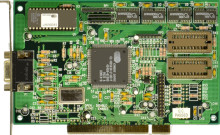
The Cirrus Logic GD5434 is a graphics processing unit (GPU) released in the mid-1990s, notable for its performance in the era of 2D graphics acceleration. It was commonly found in graphics cards for desktop computers during that time. With support for resolutions up to 1600x1200 pixels and hardware acceleration for drawing primitives, the GD5434 offered smooth graphics rendering for its time. While primarily targeted towards business and multimedia applications, it also found its way into entry-level gaming systems. Despite being surpassed by later generations of GPUs, the GD5434 remains a significant part of computing history.
Cirrus Logic GD5434 Driver
File: cl30343640.zip
adf6dd8cb37a94f8162e030c5981ab05484017e90e589404a87939ea99155227
Cirrus Logic GD5434 Driver
File: cirrus_logic_gd5434..zip
d4327b68a96be1024c9135dd08e531fdb686b94761b63402784664c3577c490f
Cirrus Logic GD5434 Driver
File: CL5434.zip
f3691fd3a34ef2d06d2f86f502b7e06f2ef02fc66ba6f340233f565bcb977a53
WINDOWS '95 INSTALLATION INSTRUCTIONS
1. Move mouse cursor to background bitmap &
click on the right mouse button.
2. Move cursor to & click on Properties.
3. Click on settings.
4. Click on Change Display Type & then click
on adapter type Change.
5. From the Select Device screen click Have Disk.
6. Insert diskette in drive and click OK.
7. Click OK to select the driver shown in the
selection box.
8. Restart Windows.



