🧱 Device
🏗️ Manufacturer
#️⃣ Model No.
36017851
Interface/port(s)
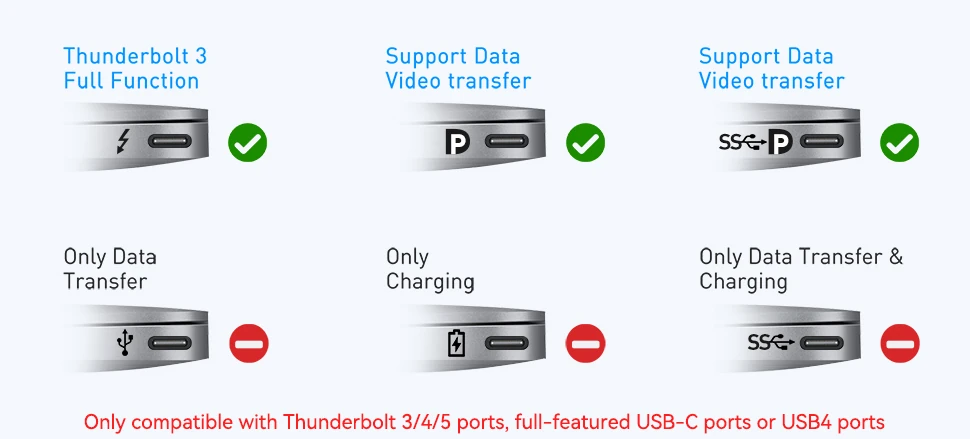
The onn. 36017851 Portable Monitor accepts video input through its USB-C connection. However, not all USB-C ports support video output. The USB-C connector's shape does not guarantee that a device can send a display signal through it. The computer, tablet, or phone must support DisplayPort Alternate Mode (DP Alt Mode) over USB-C, or another video output standard supported by the monitor.
Connecting the Monitor
- Check your device's specifications to confirm that its USB-C port supports DisplayPort Alt Mode or video output.
- Connect the monitor to the device using a full-featured USB-C cable that supports video.
- Connect the monitor to a suitable power source if required.
- Select the appropriate input on the monitor, then configure the display settings on your computer.
Important: A USB-C port that supports charging or data transfer only will not send a video signal to the monitor. If your device does not support USB-C video output, a USB-C-to-HDMI adapter alone will not solve the problem unless the device supports an alternative display solution.
Image