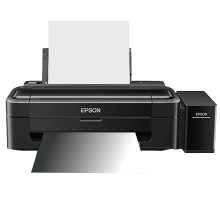
🧱 Device
Series
🏗️ Manufacturer
#️⃣ Model No.
C11CE58501
C11CE58501
Interface/port(s)
ASIN
B00WP39JLG
Windows 11, 10, 8, 7 drivers for the Epson L130 can be downloaded using the links below to the official drivers. After downloading the driver, installation is simple just run the download .exe file as an administrator and follow the onscreen prompts until you are asked to plug in your printer to the USB port.
EPSON L130 Series Printer Driver
File: L130_x64_224JAUsHomeExportAsiaML.exe
SHA-256 Checksum:
96d8edf7ac135f7d42a9ae3f831a05df4eb54fc838290e90b1078f05a09f376f
EPSON L130 Series Printer Driver
File: L130_x86_224JAUsHomeExportAsiaML.exe
SHA-256 Checksum:
54ab20be08f074ec68b681e52efa7f2a8860488a8d04e12e9df5def45c049844
What ink does the Epson Ecotank L130 use?
- T6641 (Black)
- T6642 (Cyan)
- T6643 (Magenta)
- T6644 (Yellow) Ink Bottles



