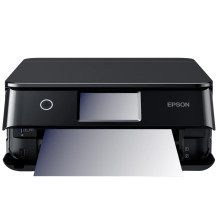
The Epson Expression Premium XP-8800 is a compact, all-in-one inkjet printer designed for home users, photographers, and small office environments that require high-quality color printing, scanning, and copying in a space-saving design. Part of Epson’s Expression Premium series, the XP-8800 is known for producing sharp text documents and vibrant photo prints, making it a popular choice for creative users.
One of the standout features of the XP-8800 is its six-color Claria Photo HD ink system, which includes photo black and grey inks. This enhances grayscale printing and improves photo detail, color accuracy, and smooth tonal transitions. It is particularly well-suited for borderless photo printing up to 8.5" x 11", making it ideal for photographers and hobbyists who want lab-quality results at home.
The printer supports multiple connectivity options, including Wi-Fi, Wi-Fi Direct, USB, and mobile printing, allowing users to print directly from smartphones, tablets, and laptops. Compatibility with Epson Smart Panel, Apple AirPrint, and Google Cloud Print makes wireless operation simple and flexible across different devices and platforms.
The XP-8800 also features a 2.4-inch color touchscreen, making navigation through menus, scanning options, and maintenance tasks straightforward. It includes dual paper trays for better paper management, allowing users to switch between photo paper and plain paper without constantly reloading. There is also a rear specialty media feed for envelopes and thicker media types.
Print speeds are solid for a photo-focused inkjet, and automatic duplex printing helps save paper by printing on both sides of a sheet. The built-in scanner provides high-resolution scanning for documents and photos, making it a reliable all-in-one solution.
In terms of drivers, the Epson XP-8800 is supported on Windows 11, Windows 10, macOS, and select Linux environments. Installing the official Epson driver package ensures access to full functionality, including scanning utilities, printer maintenance tools, and color management settings.
Overall, the Epson XP-8800 is a strong choice for users who want a compact printer that balances everyday document printing with high-quality photo output, advanced wireless features, and easy-to-use controls in a modern all-in-one device.
Epson Printer Driver
File: XP8800_X64_38000_NA.exe
59032cbbc3a9d4e9693eef399842cf7ec1caf1391287157f3e938789cd00613e
Epson Printer Driver
File: XP8800_X86_38000_NA.exe
81978a52c910a14e7c7111bd803f0240db3dd55e3b243cb77899884b6e183271
Epson Scanner Driver and Epson Scan 2 Utility
File: XP8800_EScan2_67710_NA.exe
e59a6330186f343a8b3898c7e29b74374733d00c0245adc4b1b28ab4e1113a27
Epson Printer Driver
File: XP8800_1326_NA.dmg
14e45b2aff57a00e3f3a834ced26e43c044a4e7fdba5b665b9bb2377ff2b7f75
Epson Scanner Driver and Epson Scan 2 Utility
File: XP8800_EScan2_6784_NA.dmg
cd06d211ea21c5b5746e364ab155872bdda059d8c75e837aa23a0422fe600d08



