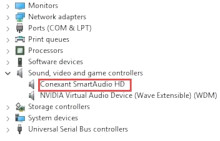
Device
Manufacturer
Also Known As
Conexant High Definition SmartAudio CX-6008
Operating System(s)
When installing the Conexant Audio Drivers for Windows 10, 8.1, 8 there may be a chance that a loss of volume around 50% can occur. To fix this go into the enhancement settings (Sound control panel...Speakers...Properties...Enhancements) and enable Loudness Equalization to get the volume fixed.
(DELL) Conexant HD SmartAudio Driver
File: 5459_Audio_Driver_RDGHT_WN32_8.65.135.0_A04.EXE
(ASUS) Conexant SmartAudio HD Driver
File: f6510a33-b9e9-4a44-a709-86b22f831d50_17af259fab655b10c4defd33274528278131c969.cab
Conexant SmartAudio HD Driver
File: conexant_audio_8.64.51.51-w8.zip
SHA-256:
5fe2945750931d82b83cbec0b6963d19b9e9363d7d488d08432ebc8d55f3d348
Systems:
(Dell)
Vostro 5459



