🧱 Device
🏗️ Manufacturer
#️⃣ Model No.
100025012
CPU/Chipset(s)
Interface/port(s)
FCC ID
PRDRX0Y
PRDHS04
Year
UPC
681131413206
Operating System(s)
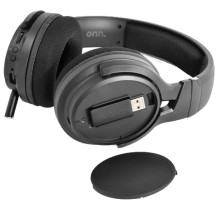
If you're not using the 3.5mm cable to connect to your PC or Laptop then you need to use the Wireless USB receiver that is stored in the right ear side of the of the headphone under a small panel, see the user manual for more information. This is not a Bluetooth device, you have to use the USB receiver for wireless use.
100025012 Wireless Gaming Headset User Guide
File: 5039772.pdf
SHA-256 Checksum:
e657ca02d7122c1efa2a857adca7c2344491538c51a6651fa6feb6ec6653dd67
- Driver Unit: 50 mm
- Driver Impedance: 32 ohms +/- 15%
- Driver Sensitivity: 115 +/-3dB (at 1k Hz)
- Driver Frequency Response: 20 Hz - 20KHz
- Mic unit: Omnidirectional
- Mic Sensitivity: -42 +/- 3dB (at 1K Hz)
- Mic Frequency Response: 100 Hz -10 KHz



