🧱 Device
🏗️ Manufacturer
#️⃣ Model No.
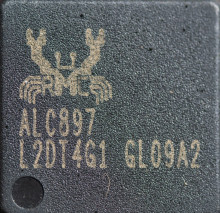
ALC897
L2DT4G1
GL09A2
CPU/Chipset(s)
Operating System(s)
The Realtek ALC897 is an audio codec commonly found in motherboards and sound cards. It supports high-definition audio playback and recording, delivering excellent audio quality. With support for 7.1 channel audio, it enables immersive surround sound experiences for gamers and home theater enthusiasts. The ALC897 also features advanced noise cancellation and impedance sensing capabilities, ensuring clear and crisp audio output while adapting to different headphones and speakers.
Realtek ALC897 Sound Driver Installation
- Download the Realtek ALC897 Sound Driver for your version of Windows (Win7_Win8_Win81_Win10_R283.exe)
- Run Win7_Win8_Win81_Win10_R283.exe and follow the on-screen instructions to install the audio driver.
- Restart your computer when the installation is complete to load the new audio driver.
- Open Device Manager or Sound Settings to verify the Realtek ALC897 audio device is installed and set as the default playback device.
- Test your speakers or headphones by playing audio to confirm the driver has been installed successfully.



