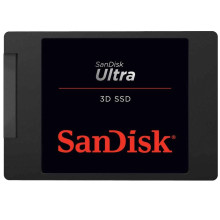
Manufacturer
Model No.
SDSSDH3-2T00-G25
SDSSDH32000G
SDSSDH32
Storage
2 TB
SSD
Interface/port(s)
Year
The SanDisk Ultra 3D 2TB SSD does not require dedicated drivers. Windows 11, Windows 10, and most modern operating systems include built-in AHCI and NVMe storage drivers that automatically detect and operate the drive. For the best performance and reliability, ensure your motherboard chipset and storage controller drivers are up to date, and keep the SSD firmware updated when available.
Quick Troubleshooting Guide
- Check Connections
Ensure the SATA data and power cables are securely connected, or reseat the SSD if using an M.2 adapter. - Verify BIOS Detection
Enter the BIOS/UEFI and confirm the SSD is detected. If not, try a different SATA port or cable. - Initialize the Drive
If Windows doesn't show the SSD, open Disk Management and initialize, partition, and format the drive if it is new. - Update System Drivers
Install the latest motherboard chipset and SATA/AHCI drivers, then check for SanDisk firmware updates if the drive is experiencing performance or stability issues.



