
Getting into your AOL Mail account should be quick, but small issues—like forgotten passwords or site errors—can get in the way. This guide walks you through the sign-in process and helps you fix the most common problems people run into. Also this should put to rest rumors that AOL is closing down.
🔑 How to Sign In to AOL Email
Step 1: Go to the AOL website https://www.aol.com/
Open your browser and head to the official AOL homepage.
Click the Mail icon in the top-right corner to get to the login page.
Step 2: Click “Sign In”

Once you’re on the mail page, click the Sign In button to begin.
Step 3: Enter your email or username
Type your AOL email address (or username) carefully.
If you’re not sure what it is, use the “Forgot username?” link.
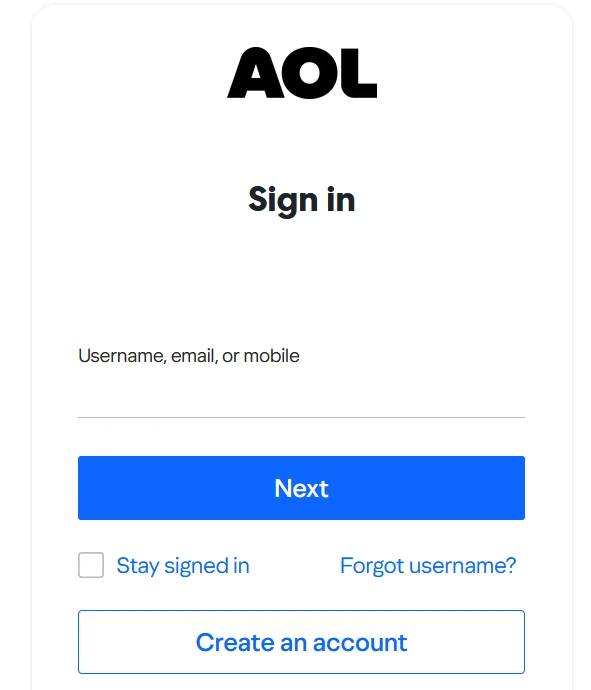
Step 4: Click “Next”
This confirms your account exists and moves you to the password step.
Step 5: Enter your password
Type your password exactly as you created it—remember, it’s case-sensitive.
If you’re stuck, click “Forgot password?” and follow the reset steps.
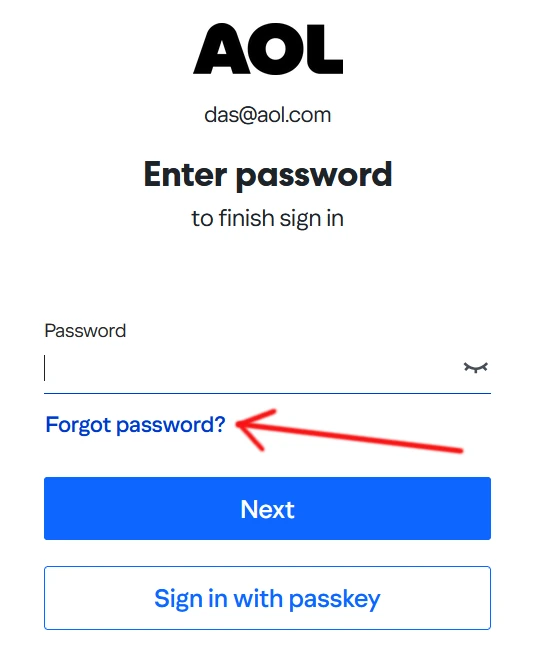
Step 6: Access your inbox
Click Sign In, and if everything checks out, you’ll land in your inbox where you can read, send, and manage emails.
⚠️ Having Trouble Signing In? Here’s What’s Going On
A lot of users search things like:
- “Is AOL Mail down?”
- “What is wrong with AOL Mail?”
- “Is AOL shutting down?”
Let’s clear those up 👇
❓ Is AOL Mail down?
Most of the time, AOL Mail is not completely down. If you can’t sign in, it’s usually caused by:
- Temporary server issues
- Browser problems (cache or extensions)
- Incorrect login details
- Internet connection issues
👉 Try refreshing the page or switching browsers first.
❓ What is wrong with AOL Mail?
If AOL isn’t working properly, common causes include:
- Outdated browser
- Blocked cookies or JavaScript
- Firewall or antivirus interference
- AOL server hiccups
Quick fixes:
- Clear your browser cache
- Try Incognito/Private mode
- Disable extensions temporarily
❓ Is AOL Mail shutting down?
No—AOL Mail is still active and supported. While it’s not as popular as it once was, there’s no official shutdown announcement.
❓ Still can’t log in?
Try these steps:
- Double-check your email and password
- Reset your password if needed
- Make sure Caps Lock is off
- Try a different device or network
💡 Helpful Tips for a Smooth Sign-In
- Use a modern browser like Chrome, Edge, or Firefox
- Keep your login details saved only on personal devices
- Avoid public Wi-Fi when accessing email accounts
- Sign out when using shared computers
📱 Can You Sign In on Mobile?
Yes, you can access AOL Mail on:
🧾 Quick Recap
- Go to AOL → Click Mail
- Enter your email → Click Next
- Enter password → Click Sign In
- Troubleshoot if needed (browser, password, connection)
✅ Final Thoughts
Signing into AOL Mail is usually straightforward, but when it doesn’t work, it’s often something small causing the issue. Whether it’s a forgotten password, a browser glitch, or a temporary outage, most problems can be fixed in just a few minutes.
If you’re still stuck after trying everything, AOL support is your next best step—but in most cases, one of the fixes above will get you back into your inbox quickly.



