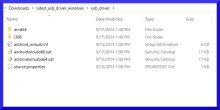
Drivers are needed to connect a Android device to a Windows computer. This allows the ADB (Android Device Bridge) to operate and access the phones system and perform upgrade, or backups.
ADB USB Driver
File: adb-setup-1.4.3.zip
2125647c187067025667e4023e7d88eb568de2a4870b0e5b1aa355b6153d09be
Qualcomm USB Driver
File: qualcomm_driver-4.zip
6f71a3f6451ed68b4feedd9cd399147d02e10fa59112e9e1d061b918c05b0ff3
Step 1 — Download and extract the Android USB Driver to your PC.
Step 2 — Click Start (Windows) -> Control Panel -> Device Manager (Select Device Manager).
Step 3 — On the Device Manager window find and click on computer name to select Add legacy hardware.
Step 4 — Select Next
Step 5 — Selext Install the hardware that I manually select from a list (Advanced), and click the Next
Step 6 — Select Show All Devices afterward click Next button again.
Step 7 — Click the Have Disk button.
Step 8 — Click Browse button to find the extracted Android ADB Driver -> android_winusb.inf and click on Open.
Step 9 — Click OK.
Step 10 — Now select the Android ADB Interface -> click Next button.
Step 11 — Click Next button again.
Step 12 — Windows Security box will appear, to confirm whether you really want to install the Android USB Driver, so just choose the Install this driver software anyway.
Step 13 — Once you clicked the Finish button, then repeat from step 2 to choose Android Composite ADB Interface.
Step 14 - Done.



