
Prolific PL2303 USB to Serial 1.18 Driver — 4-Step Install
- Download the Driver – Download the Prolific PL2302/PL2303 USB-to-Serial Driver version 1.18 package below and save the ZIP file to your computer.
- Extract the ZIP File – Right-click the downloaded ZIP file, select Extract All, and open the extracted driver folder.
- Run the Installer – Double-click the Prolific driver installer
PL2303_Prolific_DriverInstaller_v1180.exe, and follow the on-screen instructions. - Connect and Verify – Connect the USB-to-Serial adapter after installation. Open Device Manager → Ports (COM & LPT) and verify that the Prolific adapter appears with a COM port number. Restart Windows if prompted.
Image
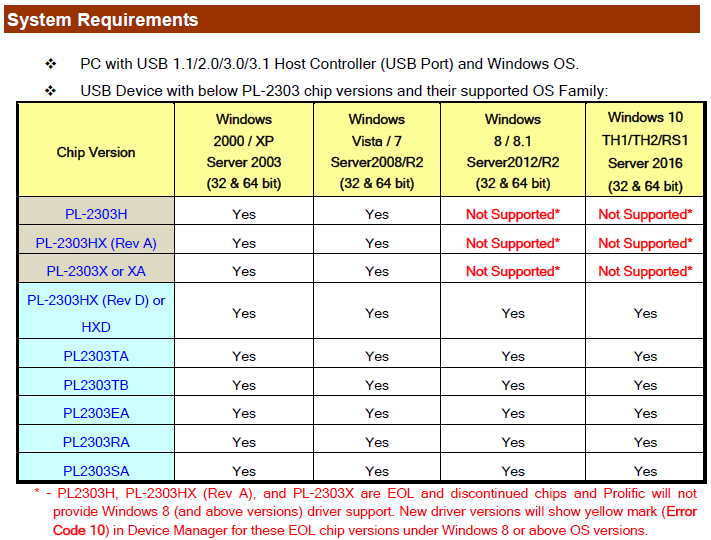
Prolific PL2303 USB-to-Serial Driver
File: PL2303_Prolific_DriverInstaller_v1180.zip
SHA-256:
7bba143918f25c12158eef70cce93e332cc256d3bf9df4fe5f08f68df242569b



