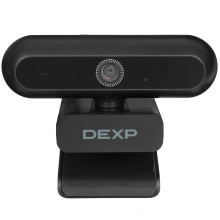
🧱 Device
🏗️ Manufacturer
#️⃣ Model No.
DWC-FHD03
Interface/port(s)
Video Technology
If your DEXP DWC-FHD03 Webcam is not working as expected, try these quick troubleshooting steps:
- Webcam not detected: Disconnect and reconnect the USB cable, try a different USB port, and restart your computer.
- No image or black screen: Close other applications that may be using the webcam and check that the correct camera is selected in your video conferencing software.
- Blurry image: Clean the camera lens and ensure you are sitting within the recommended distance. The DWC-FHD03 does not include manual focus adjustment, so focus cannot be changed by rotating the lens.
- Poor video quality: Increase room lighting, as image quality is significantly better in bright environments.
- Microphone not working: Select DEXP DWC-FHD03 Microphone as the default recording device in your operating system and conferencing application.
- Still having issues? Reinstall the webcam driver (if applicable) or remove the device from Device Manager and reconnect it to allow Windows to detect it again.
📖Documentation/Manuals:



