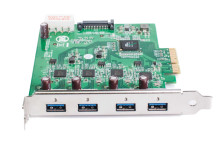
Device
Manufacturer
Model No.
FL1000
Interface/port(s)
There is a number of places you might see the Fresco Logic FL1000 Chipset used, onboard, external card like the image shown.
Quick Install
- Power off the PC and install the PCIe adapter.
- Boot Windows and run the Fresco Logic driver installer.
- Restart the computer when prompted.
- Connect USB devices and verify the controller in Device Manager.
Fresco Logic xHCI (USB3) Controller Drivers
File: Fresco Logic xHCI USB3.0-3.0_3.8.35514.0.exe
SHA-256:
0b0033b819f03e8b7aadd19f6d2bbf5f71875c09072d62772a5c48e59d65a72c
Fresco Logic xHCI (USB3) Controller FL1000/FL1009/FL1100 Series Driver
File: 64bit-Fresco-Logic USB 3.0 Drivers v3.6.8.0 WHQL.zip
SHA-256:
956674f6b5082a364afce5055a2c40d779e2093d73773fa9cbf3325119573b70
Fresco Logic xHCI (USB3) Controller FL1000/FL1009/FL1100 Series Driver
File: Fresco Logic xHCI USB3.0-3.5.100.0.exe
SHA-256:
c6bfdafdee64eb6da29d513e027b40f7af8cc62e898064cf777a919f49ef5bd4
HWID(s)



