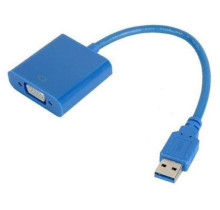
There is a bunch of adapters that use the Fresco Logic FL2000 chipset and people usually don’t know this until they plug the adapter into a computer and they are prompted with a unknown device called FL2000. Luckly, we have the drivers below with our latest version being 2.1.36287.0 for Windows 11/10/8/ and 7. Without these drivers the display may not display at all. Another thing that needs to be pointed out is that this is a USB 3.0 device, and USB 3.0 is required for maximum speed and for high video resolution to be able to process at a normal frame rate/refresh rate.
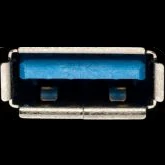
Below is a reference for a USB type A 3.0 port. USB 3.0 Ports are usually have a Blue insert. (Fig.1) However in the case of a USB C port there is no indicator of speed, sometimes manufactures will put a SS on the side to indicate SuperSpeed.
Fresco Logic USB Display Driver
File: FL2000-2.1.36287.0.exe
50f6559a6562b92e036508cf7e7e7ff3349bf95f791ae8d3143f0937ce289c76
Fresco Logic USB Display Driver
File: FL2000-2.1.34054.0.exe
5e0590d6dccc198b427c7c51ca5cc50448c2d4aaae275322b1378d78058750e7
Fresco Logic USB Display Driver
File: FL2000-2.1.33676.0.exe
f1969b1ce2a8ed547348a4009ab3be4f4d97a4f2df6031ae5c1f62cc7d0b3278
Fresco Logic USB Display Driver
File: FLUSBVGA-1.1.323.0.exe
455e5fa4ae899d7cfd85e0d96008c00c8ad3866a5710f058c9107fd46559e872



