Please use the firmware or driver update for your device available on this page at your own risk. While we strive to offer reliable advice and assistance to you, we cannot take responsibility for any problems that may occur due to an incorrect use of this update.
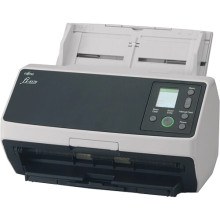
The Fujitsu fi-8170 Scanner Driver Update page provides information about how this scanner can benefit you in the business environment, where scanning speed is crucial. This device has an impressive scanning rate of up to 80 pages per minute (ppm) or 160 images per minute (ipm) in its duplex scanning mode. Such speed allows users of Fujitsu fi-8170 to effectively process high amounts of paperwork.
In addition to this, it also offers several advanced image processing capabilities. Its Intelligent Sonic Paper Protection function increases speed depending on the paper thickness in order to avoid damage during scanning and protect your documents. Moreover, the PaperStream IP driver improves the image resolution, allowing you to get high-quality pictures every time you perform your operations with the device.
In order to maximize the efficiency of your device and enjoy its full capacity, download the latest driver from this page using the instructions provided below.
PaperStream IP (TWAIN) Driver
File: PSIPTWAIN-3_24_0.exe
be3523e41a5cea5e0cb082f25b6597f342537cf5ecd39a4dc0214eec00af9dd2
PaperStream IP (TWAIN) Driver
File: PSIPTWAIN-3_20_0.exe
d3878903eefb96b58f5a1040793e4b56b42edf7a6af4cb6273708b4fc037bb4a
PaperStream IP (TWAIN) Driver
File: PSIPTWAIN-3_10_0.exe
6a88a80468505f70704332541fc1c85ca78728198af013d3942dd992120961d5
PaperStream IP (ISIS) Bundle Driver
File: PSIPISIS-H-3_0_2.exe
e81be0f206a2578e4960bb5b0d217bff0531689cffe1be92e3852dcb4e7eb078



