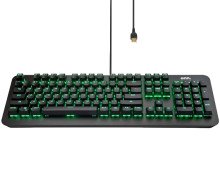
🧱 Device
🏗️ Manufacturer
#️⃣ Model No.
100004357
Interface/port(s)
The onn. Gaming Mechanical Keyboard 100004357 uses the Onn Setup20221112V1.0.0.6.12.exe software package for Windows. The software provides support for configuring the keyboard and its available features.
Quick Installation
- Download Onn Setup20221112V1.0.0.6.12.exe.
- Right-click the file and select Run as administrator.
- Follow the on-screen installation instructions.
- Connect the onn. Gaming Mechanical Keyboard if it is not already connected.
- Complete the installation and restart Windows if prompted.
Macro Software and Driver
File: Onn Setup20221112V1.0.0.6.12.exe
SHA-256 Checksum:
68052fe92a7701f4f4b7fdba395182a6eac6a567d2a7d7549ccbaba31dc81f3b
Macro Software and Driver
File: Onn Setup20211115V1.0.0.5.05.exe
SHA-256 Checksum:
d55ddcfd1e157d287dea0c1ab39ce690add03a127ee11bdd41f847c6ea9bf59f
Keyboard Driver
File: Onn.Driver.zip
SHA-256 Checksum:
51161de27521395efdcb3c8ebf57251b356cc9c059ae71c7a2dd996ec4dd15ec
- Blue mechanical switches (guaranteed to 50 million clicks) with solid aluminum frame
- Adjustable lighting with 16.8 million combinations/effects and key marco programming software (Windows only)
- Removable magnetic wrist rest
- PC and Mac compatible with USB plug and play
- Programmable RGB backlit keys with radiant lighting effects Anti-ghosting for simultaneous keystrokes
- USB plug and play Windows and Mac compatible
- Measures 17 in L x 8 in W x 1.57 in H (43 cm x 20.3 cm x 3.9 cm)



