🧱 Device
🏗️ Manufacturer
CPU/Chipset(s)
🛜 Network Technology
Interface/port(s)
Operating System(s)
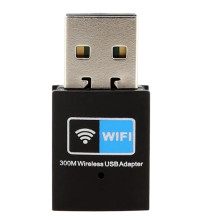
There are countless generic WiFi adapters that use the Realtek RTL8192 chipset, drivers are included with Windows, and the best way to have the drivers installed is to run an update on the driver in Windows. If the device won’t install because it has a different device ID you can always do a force install of the drivers.
Realtek RTL8192CU Wireless LAN 802.11n USB 2.0 Network Adapter
File: network-realtek-rtl8192cu.zip
SHA-256 Checksum:
b6821740eb16177b9fdcbc70e303fb3a0cdacad7bb43ced62cc300f3dce91706
Realtek RTL8192CU Wireless LAN 802.11n USB 2.0 Network Adapter
File: 20782674_ef6aecb6b9d93335fa681013b12000254deca2de.cab
Realtek RTL8192CU Wireless LAN 802.11n USB 2.0 Network Adapter
File: 20757972_627845439d6ea733b48dd90b6f5b21e32b76cfbb.cab
Realtek RTL8192CU Wireless LAN 802.11n USB 2.0 Network Adapter
File: 20372791_aac10d2a7422b932c3584c65cd336f497762a24c.cab
Realtek RTL8192CU Wireless LAN 802.11n USB 2.0 Network Adapter
File: 20391278_882b28af9352887b67ab11bfb498e213167d05b9.cab



