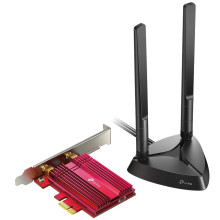
Device
Manufacturer
Model No.
TX3000E V1/V2/V2.6
AX3000
CPU/Chipset(s)
Interface/port(s)
Operating System(s)
The TP-Link Archer AX3000 series includes PCIe wireless network adapters that provide Wi-Fi connectivity and Bluetooth support. The correct drivers depend on the exact model and hardware revision, such as the Archer TX3000E, TX50E, or TX55E. Before downloading, check the model and revision printed on the adapter or its packaging, then select the matching driver package below.
Driver Installation
- Check the model number and hardware revision printed on the adapter label.
- Download the corresponding Wi-Fi and Bluetooth drivers listed below for your revision and Windows version.
- Extract the downloaded ZIP files and run the included setup programs, if provided.
- Restart Windows and check Device Manager to confirm that both Wi-Fi and Bluetooth are working.
Important: Bluetooth may require the adapter's internal USB cable to be connected to a USB header on the motherboard. Installing the Wi-Fi driver alone may not enable Bluetooth.



