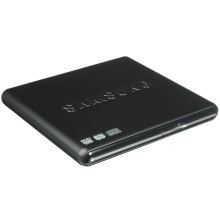
🧱 Device
🏗️ Manufacturer
#️⃣ Model No.
SE-S084D
Year
Samsung SE-S084D External DVD Writer – Quick Installation
- Connect the DVD writer to your computer using the supplied USB cable.
- If included, connect the secondary USB power plug if one USB port does not provide enough power.
- Windows will automatically install the generic optical drive driver.
- Wait until the drive appears in File Explorer.
- Insert a CD or DVD to verify the drive is working.
Samsung SE-S084D External DVD Writer – Firmware Upgrade
- Download the correct firmware for your Samsung SE-S084D model below..
- Close all applications and remove any disc from the drive.
- Connect the DVD writer directly to a USB port (avoid USB hubs).
- Run the firmware update utility as Administrator.
- Follow the on-screen instructions and do not disconnect the drive during the update.
- Restart your computer after the update completes.
- Verify the new firmware version if prompted by the utility. Firmware updates improve compatibility, reliability, and media support.
Samsung SE-S084D Firmware Update
File: SE-S084D_TS02.exe
SHA-256 Checksum:
0846b6c468189964b97ef732a6571c469370e8bee7c10499be89e3b66c3d33c2
Samsung SE-S084D Firmware Update
File: SE-S084D_TS01.exe
SHA-256 Checksum:
63ea85e9df85558a8b61415762c2699c3dff33832aab71db818a6475a9411da5



