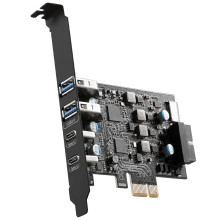
🧱 Device
🏗️ Manufacturer
#️⃣ Model No.
UP-3266
CPU/Chipset(s)
Interface/port(s)
ASIN
B0DYJ4M47V
Quick Installation Instructions
- Download the Renesas/NEC uPD720201 chipset driver for the YEELIYA UP-3266 PCIe USB expansion card below.
- Power off your computer and install the PCIe card into an available PCI Express slot if it is not already installed.
- Start Windows and run the downloaded driver installer as an administrator.
- Follow the on-screen instructions and restart your computer when prompted.
- After rebooting, open Device Manager and verify the Renesas USB 3.0 eXtensible Host Controller appears without any warning icons. The six USB ports are now ready for use.



