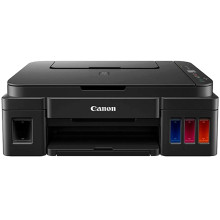
The Canon PIXMA G2110 Printer was a versatile and efficient printing solution, boasting high-quality outputs and cost-effective performance. With its innovative MegaTank ink system, it minimized the need for frequent cartridge replacements, ensuring continuous printing without compromising on quality. Equipped with scanning and copying capabilities, it offered versatility for various tasks. The Canon PIXMA G2110 Printer Driver complemented its functionality by facilitating seamless communication between the printer and compatible devices. By enabling easy installation and intuitive control over printing tasks, the driver enhanced user experience, optimizing the printer's capabilities for efficient and reliable performance in both home and office environments.
G2010 series MP Drivers
File: mpp_-win-g2010-1_02-ea34_2.exe
499e90d9945731ffab26403aee4ab1aa86d549201c88c146f54a54635c4fcebc
G2010 series MP Drivers
File: mpp_-win-g2010-1_01-ea34_2.exe
e8a055030df60362d7a791fcf26a53acfbdb5ad9aae275de4645a66c5bc7a3aa
G2010 series Full Driver & Software Package
File: win-g2010-1_2-n_mcd.exe
76433d63e17ba9e1d1442c931ccb8b2a83e68046d060d20e4c5ab86b60ba842d
Canon G2010 series User Manual
File: G2010ser_OnlineManual_Win_EN_V02.pdf
b781f863b69e0cf0b46c5681c70c0eb1240a1327f9523ff1ff0c9cd6abffe259
What ink does the Canon PIXMA G2110 use?
GI- 190 Black: Pigment Black Ink
GI- 190 Cyan/Magenta/Yellow: Dye Based Inks
GI-190 Black Ink Bottle (135 ml)
GI-190 Cyan Ink Bottle (70 ml)
GI-190 Magenta Ink Bottle (70 ml)
GI-190 Yellow Ink Bottle (70 ml)



