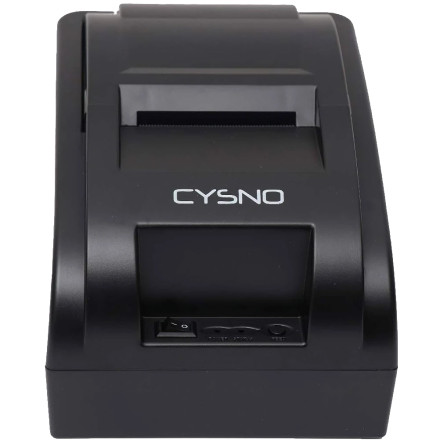
🧱 Device
#️⃣ Model No.
5890K
Also Known As
CYSNO BIS 5890K
Interface/port(s)
The CYSNO POS 58 Printer Driver enables compatible 58mm thermal receipt printers to communicate with Windows. It provides the necessary software for printing receipts, labels, and other point-of-sale documents from supported POS applications.
4 Quick Steps to Install
- Download – Download POS Printer Driver Setup 58mm.exe to your computer.
- Run the installer – Double-click the
.exefile and approve the Windows security prompt if displayed. - Select the printer – Follow the setup wizard and select your connected CYSNO 58mm POS printer and the appropriate connection port.
- Finish & test – Complete the installation, then print a Windows test page or receipt to verify the printer is working
POS-58 Drivers
File: POS Printer Driver Setup 58mm.exe
SHA-256 Checksum:
03f42e93c51b2521861c6130ae6520833e07444830d7f64fcd864e0eb91ddf4e
POS-58 Drivers
File: pos-printer-driver-setup.exe
SHA-256 Checksum:
3fcc06f0ab0cfcc1aae22d12475136fb7f19893819b766b3222d35a65dab0e2b
POS-58 Drivers
File: POS58.exe
SHA-256 Checksum:
bfaa3f205714595ffc3d6357c59d40484a9f8bb70983b9c29a851a42e09ca52b
POS-58 Drivers
File: linux-pos58-80.zip
SHA-256 Checksum:
f90888548df3317a6f7efa4ef2fdc023e10f2146f758d5d434c737de049dec12
POS-58 All Drivers & Resources
File: 58MMThermalrecieptprinter.zip
SHA-256 Checksum:
2c722cde4dca23e0e354d6decb2ad566e941c5f00cde52cc2cf5f7d0778bdd5b
POS-58 User Manual
File: 58MM-user-manual.pdf
SHA-256 Checksum:
1e3818612fef819746b9a2327538d5abc870d89e2ae4dc8ba845e3762f0c9675



