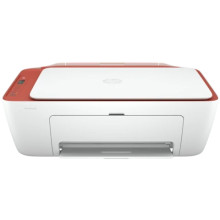
The HP DeskJet 2700 All-in-One Printer Series presents an integrated solution for basic printing, scanning, and copying requirements. Operating with inkjet technology, it employs drop-on-demand thermal inkjet mechanisms to discharge microscopic droplets of ink through nozzles onto media, offering color and monochrome outputs.
The series incorporates wireless connectivity, allowing seamless data exchange through IEEE 802.11b/g/n standards over a 2.4 GHz frequency range. The USB 2.0 interface ensures compatibility with wired connections, enhancing versatility.
The printer has maximum resolution of 4800 x 1200 dpi for accurate reproduction. The DeskJet 2700 features an embedded processor, supporting print job processing and communication protocols.
The firmware controls the integrated hardware, facilitating synchronization between modules. The compact design accommodates space limitations while maintaining accessibility for ink cartridge replacement, paper loading, and maintenance procedures. In terms of consumables, the series utilizes thermal inkjet cartridges that dispense ink with precision, ensuring consistent and high-quality output.
HP Easy Start Printer Setup Software
File: HPEasyStart-13.6.5-DJ2700_51_4_4865_1_Webpack.exe
fcfb9d9a6da978c48bd0ffd206b2fa218917eb5ace89b710e234aa96594841d9
What Ink cartridges does the HP DeskJet 2700 use?
HP 67XL Black High Yield Ink Cartridge (3YM57AN#140), print up to 240 pages
HP 67 Tri-Color Standard Yield Ink Cartridge (3YM55AN#140), print up to 100 pages
HP 67XL/67 Black High Yield and Tri-Color Standard Yield Ink Cartridge, 2/Pack (3YP30AN#140)



