Device
Manufacturer
Model No.
881-000213
A-00061
Interface/port(s)
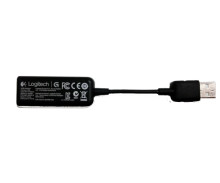
The Logitech G430 Gaming Headset came with two option, plugging the headset in directly into a computer/laptop using the 3.5mm headphone and microphone jacks or if your computer doesn't have access to it you can use the USB adapter illistrated here that is a mini sound card. In order to install the Logitech G430 Gaming Headset you must install the Logitech Gaming software that is below.
Logitech Gaming Software
File: LGS_9.04.49_x64_Logitech.exe
Logitech Gaming Software
File: LGS_9.04.49_x86_Logitech.exe
(Older Version) Logitech Gaming Software
File: LGS_9.02.65_x86_Logitech.exe
(Older Version) Logitech Gaming Software
File: LGS_9.00.42_x64_Logitech.exe
(Older Version)Logitech Gaming Software Driver
File: LGS_4_60.zip
SHA-256:
61640ef8bc067dce9f3bb3be5dea276802afc1288d344f598a1304b73466751a



