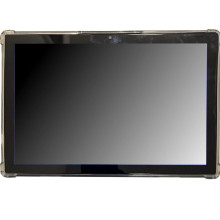
🧱 Device
#️⃣ Model No.
WS-T01
WSTABCOM090124095918
Also Known As
WS Education Electronics
Storage
32 GB
Version:
v13.0
Operating System(s)
WS WS-T01 Educational Android Tablet (Android 10) – Troubleshooting Guide
Tablet Won't Turn On
- Charge the tablet for at least 30 minutes using the supplied charger.
- Press and hold the Power button for 10–15 seconds to force a restart.
Wi-Fi Won't Connect
- Verify Airplane Mode is turned off.
- Restart the tablet and your Wi-Fi router, then reconnect to the network.
Apps Keep Crashing
- Restart the tablet.
- Update the app, or clear its cache and data from Settings > Apps.
Tablet Running Slowly
- Close unused apps.
- Delete unnecessary files and restart the tablet to free up memory.
Factory Reset
If problems persist, back up any important data and perform a Factory Reset from Settings > System > Reset Options > Erase all data (factory reset). This removes all personal data and restores the tablet to its default settings.



