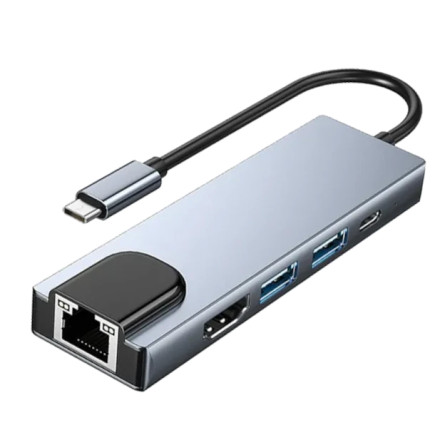
KNUP 5-in-1 USB-C Adapter AD143 – Troubleshooting Guide
The KNUP AD143 is a 5-in-1 USB-C multiport adapter designed to expand the connectivity of compatible laptops and other USB-C devices. It provides additional connections for USB peripherals, HDMI displays, wired Ethernet, and USB-C Power Delivery charging.
An important consideration when using this adapter is that not all USB-C ports support the same features. Although the connector looks identical, the capabilities of the port depend on the hardware and specifications of the computer.
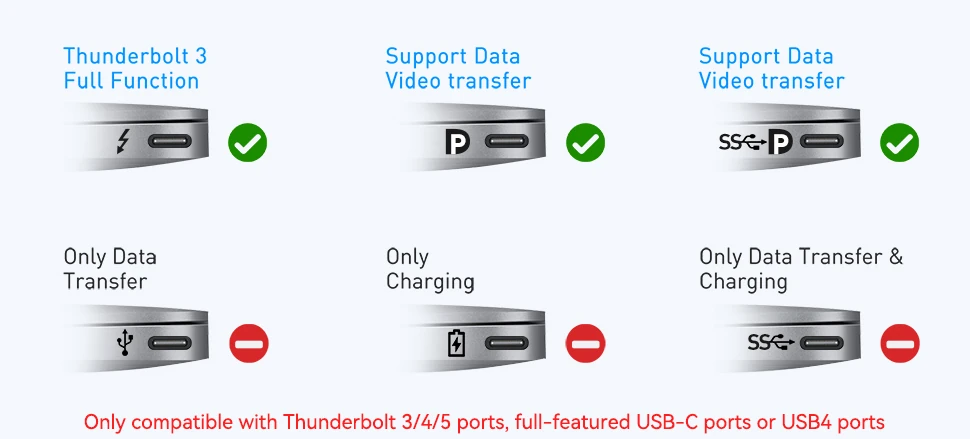
Why Not All USB-C Ports Are the Same
USB-C describes the physical connector, not the capabilities of the connection. Depending on the computer, a USB-C port may support some or all of the following:
- USB Data: Supports peripherals such as keyboards, mice, flash drives, and external storage.
- DisplayPort Alt Mode: Allows video output through a compatible USB-C hub to an external monitor using HDMI.
- Power Delivery (PD): Allows compatible chargers to supply power to the laptop through the adapter.
- USB 3.0/3.2: Provides faster data transfer than USB 2.0.
- Thunderbolt: Offers additional bandwidth and connectivity features but is not supported by every USB-C port.
A USB-C adapter cannot add functionality that the computer itself does not support.
KNUP AD143 Troubleshooting
- HDMI monitor not displaying: Check whether the computer's USB-C port supports DisplayPort Alt Mode. A USB-C port that supports data only cannot output video through the adapter.
- USB devices not detected: Disconnect the adapter and reconnect it. Try another USB port and test the peripheral directly on the computer.
- Ethernet not working: Check the Ethernet cable and router connection. Open Device Manager and look under Network Adapters to see whether Windows recognizes the adapter.
- Laptop not charging: Connect a compatible USB-C Power Delivery charger to the adapter's PD input. The computer must also support USB-C Power Delivery charging.
- USB devices disconnecting: Disconnect unnecessary peripherals and check whether the connected devices are drawing more power than the adapter can provide.
- Adapter not recognized: Try another USB-C port and check Device Manager for unidentified USB devices.
Does the KNUP AD143 Require Drivers?
The KNUP AD143 is designed to work as a plug-and-play USB-C adapter and should not normally require a separate driver installation. Windows generally installs the necessary drivers automatically for its USB hub and networking components.
Important: If the USB ports work but HDMI does not, check the USB-C port specifications on your laptop before assuming the adapter is defective. The absence of DisplayPort Alt Mode support is a common reason USB-C HDMI adapters fail to display video.