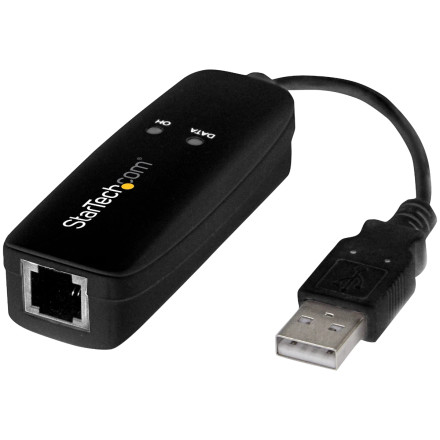
The StarTech USB56KEMH2 is an external USB 2.0 56K fax modem designed to provide dial-up internet access and telephone-line fax capabilities on desktop and laptop computers. It uses the Conexant CX93010-21Z modem chipset and supports V.92, V.90, and other common dial-up modem standards.
The archived [Conexant CX93010] 56K USB Modem.zip package includes drivers for multiple generations of Windows, extending support back to Windows 98 Second Edition (98SE). This makes it useful for restoring dial-up and fax functionality on both modern and legacy computers.
Installing the StarTech USB56KEMH2 Drivers
- Download
[Conexant CX93010] 56K USB Modem.zip. - Extract the ZIP archive using Windows File Explorer or 7-Zip.
- Open the folder corresponding to your installed Windows version.
- Locate the driver installer and right-click it.
- Select Run as administrator.
- Follow the installation instructions and restart Windows if prompted.
Windows 11, 10, 8, and 8.1: These operating systems include built-in drivers for the modem, so a separate installation may not be necessary. The archived package is available for manual installation if Windows does not recognize the device.
Driver Information
- Manufacturer: StarTech.com
- Model: USB56KEMH2
- Chipset: Conexant CX93010-21Z
- File:
[Conexant CX93010] 56K USB Modem.zip - Windows 8/10: Version 2.0.23.0
- Windows 7: Version 2.0.21.50
- Vista/XP/2000/ME/98SE: Version 2.00.08.50
- Operating systems: Windows 11, 10, 8.1, 8, 7, Vista, XP, 2000, ME, 98SE
Note: The Windows 98SE through Vista packages are particularly useful for legacy computer restoration. Driver availability does not necessarily guarantee compatibility with every USB controller or Windows configuration.
Conexant CX93010 56K USB Modem Driver
File: [Conexant CX93010] 56K USB Modem.zip
23b870496cf3db37aee5291fe2ec2c212174c27844969e9dee9aa1c7b3ffb360