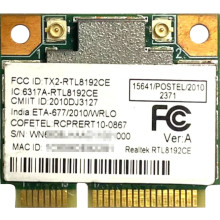
Drivers for older operating systems will most likely need to be installed for the Realtek RTL8192CE, later operating system should have drivers included provided Windows updates are on. If you are relying on this adapter to be able to connect to the internet, then you may need to install drivers manually.
The drivers below are is specifically designed to optimize the performance of the Realtek RTL8192CE chipset, ensuring stable and reliable wireless connections, so having the most up-to-date drivers are extremely important.
Installing the Realtek RTL8192CE driver on Windows is straightforward. The driver package can typically be downloaded below, It is crucial to ensure that the driver version matches your operating system to avoid compatibility issues, or not installing at all.
Realtek RTL8192CE-VAU Wireless LAN 802.11n USB minicard Driver
File: 20782674_ef6aecb6b9d93335fa681013b12000254deca2de.cab
9f4d10a353923709237454f513ffed918b54910f030132054eede21634ed4a0e
Realtek RTL8192CE-VAU Wireless LAN 802.11n USB minicard Driver
File: 20782673_668e7380f89e3d23f7184aad0120f862fa613968.cab
990009b2782b12d7bcdf3c7059b8fe09f042ee81e79d787a06a0fe2dd6f181ab
Realtek RTL8192CE-VAU Wireless LAN 802.11n USB minicard Driver
File: 20757972_627845439d6ea733b48dd90b6f5b21e32b76cfbb.cab
4fc8ab9ea9f8cecc5f2a9713e2ca8ce35966a97195c09e72699ee03c22c93913
Realtek RTL8192CE-VAU Wireless LAN 802.11n USB minicard Driver
File: 20757973_2e634af9235a75349c01b747ea27c0e9f28d0703.cab
90b5a022fde3afb38411a8fbdb8c409320778ebc35abb2f1fc731e88e30571a2
Realtek RTL8192CE-VA4 WLAN Adapter Driver
File: RTLWlanE_WindowsDriver_2007.12.0419.2013.zip
9819acfc28cbb8ca3eee8c984cd06a79f981a70721daeea26ffcd66dd4058924



