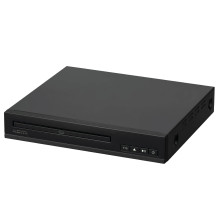
Device
Manufacturer
Model No.
100093892
Remote Control
Operating System(s)
Onn. 100093892 HDMI DVD Player Common Issues & Fixes
1. No Picture on TV
- Make sure the HDMI cable is fully connected to both the TV and player.
- Switch your TV input/source to the correct HDMI port.
- Try a different HDMI cable or port (the unit includes one, but cables can fail).
2. No Sound
- Check TV volume and ensure it’s not muted.
- Go into the DVD player menu and confirm audio output settings.
- Try another HDMI port or use composite cables if available.
3. Disc Not Reading
- Clean the DVD (fingerprints/scratches can cause errors).
- Make sure the disc is compatible (standard DVDs work best).
- Try another disc to rule out a bad DVD.
4. Remote Not Working
- Replace batteries and ensure correct polarity.
- Make sure nothing is blocking the sensor.
- If lost or broken, you may need a replacement remote.
- 5. Player Freezing or Shutting Off
- Unplug the unit for 1–2 minutes to reset it.
- Ensure proper ventilation (overheating can cause shutdowns).
- Try a different power outlet.
6. Black & White or Fuzzy Screen
- Usually caused by incorrect TV input or resolution mismatch.
- Re-seat cables and restart both TV and player.



