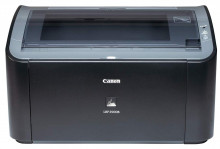
The Canon lbp2900b is an older laser printer that is still used today given that it is a work horse and will last a long time with good maintenance. The Canon lbp2900b is a USB printer and there are drivers that can be download for various operating systems going back to Windows 98.
Quick Install
- Download the LBP2900B driver.
- Run the installer.
- Connect the printer via USB when prompted.
- Restart if required and print a test page.
Canon LBP2900/2900B CAPT Printer Driver
File: LBP2900_R150_V330_W64_uk_EN_2.exe
953571b89810ba5644a79e42b9cf9aa38e0ac12f7d183b64d588f6c281341096
Canon LBP2900/2900B CAPT Printer Driver
File: LBP2900_R150_V330_W32_uk_EN_2.exe
5892a60a785558b902f1249bcb6dfd34100335caa95a0a89a54437e5440cc5dd
Canon CAPT Printer Driver
File: LBP2900_R112_V302_Win_x32_EN_7.exe
67a3c1448670651115b3420a53e70d4196cdb3451fa848f508494c2b1f327978
Printer Type: Black & White Laser
Scanner Features
Maximum Horizontal Resolution(dpi): 600
Maximum Vertical Resolution(dpi): 600
Print Speed
First Copy Out Time ( FCOT)(Seconds): 9.3
Black Print Speed (ppm)(ppm): 12
Colour Print Speed (ppm)(ppm): No
Print Speed - Black Graphic(ppm): 12
Print Speed - Colour Graphic(ppm): No
Media Handling
Input (Plain Paper): 150
Paper Size: A4
Original consumables
Toner Type: 303
Black Toner Cartridge (Print Capacity)(A4 Paper Size): 2000
Connectivity: USB Port
Memory / Buffer
Built in RAM Upgradeable(MB): 2
Environment
Relative Humidity(Percentage): 20-80



