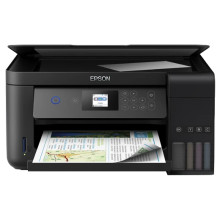
The Epson EcoTank L4160 is a wireless all-in-one printer that is designed to provide high-quality, cost-effective printing solutions for home and small office users. This printer features an integrated ink tank system that allows you to print up to 7,500 black and white pages or 6,000 color pages, before the need to refill ink. This ensures that you can print more and spend less on ink replacements. The printer also comes with a variety of features that enable easy and convenient printing, scanning, and copying, including Wi-Fi connectivity, mobile printing options, and a 1.44-inch color LCD screen. With its high page yield and low-cost replacement ink bottles, the Epson EcoTank L4160 is a smart choice for those who value efficiency and affordability in their printing needs.
Printer Driver
File: L4160_X64_27002_LA.exe
0a6e62f2c0f8b7372836164f896e9b08c0da8c720bb6c6a0c39e61ed080fccd7
Printer Driver
File: L4160_X86_27002_LA.exe
218a1a84fe30787860217f21dc71837ed6f9ab4a37a94ca2b0e2fe6435b5df38
Scanner Driver and Epson Scan 2 Utility
File: L4160_EScan2_65230_LA.exe
6bb7f701337bdf2af084204367bf113f8dce53fc04982e6793207aa9bd7abaa9
What ink cartridges does the Epson Ecotank L4160 All-in-One Printer use?
Well it actually uses ink bottles, here is what they fill:
Replacement Ink:
- 1 bottle with black ink: Prints up to 7,500 pages
- 3 bottles with color inks (Cyan, Magenta, Yellow) Prints up to 6,000 pages



