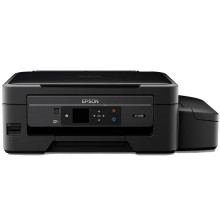
The Epson Expression ET-2550 EcoTank All-in-One Printer is a revolutionary printing solution designed for cost-conscious users. It features an innovative EcoTank system that eliminates the need for traditional ink cartridges, using refillable tanks instead. This results in significantly lower printing costs and less environmental impact. The printer excels in producing high-quality prints with sharp text and vibrant colors. Its all-in-one functionality includes printing, scanning, and copying, making it versatile for various tasks. To optimize its performance, users can install the Epson Expression ET-2550 EcoTank All-in-One Printer Drivers, ensuring seamless communication between the printer and connected devices, leading to efficient and reliable printing experiences.
Epson Printer Driver
File: ET2550_X64_24101_NA.exe
0048379efe3375d06c113555f42ad30417177a0980db26aa6f2b6b4b1f57f7e1
Epson Printer Driver
File: ET2550_X86_24101_NA.exe
083a56f3b9dd7b6861124f53ba2cb7627633d133383eb62a65efa5532c594cc8
Epson Scanner Driver and EPSON Scan Utility
File: epson16412.exe
c75e909a578a7efb03a5aa249545b438ec67cbef708c5df8d0c60b9b5114e264
Epson Printer Driver
File: CISS_1262_NA.dmg
59cd136416b2d4d509ea05004cb412e656f72b07fed131b8407dc28624d0446d
Epson Scanner Driver and Epson Scan 2 Utility
File: ET2550_EScan2_64143_NA.dmg
a94e6e2cc88e464207dc41fc93128088763bb4650759e5132e3045110716c2a7
Recovery Mode Firmware for Recovery Mode error
File: FW_BM20I3.exe
9465976accc04314337fe875cb07c623c2ff03c284179c17381658baec816d75
What ink does the Epson Expression ET-2550 use?
664 Black, Cyan, Magenta, Yellow (ISO Yield, Epson Methodology - Black: 4,000, Color: 6,500)



