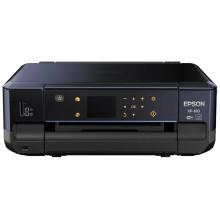
Device
Manufacturer
Model No.
C11CD31201
Also Known As
EPSON Expression Premium XP-610
Small-in-One All-in-One
Network Technology
Interface/port(s)
Drivers for the Epson XP-610 printer can be downloaded below for Windows 11, 10, 8.1, 8, 7, Vista, XP. The combo package is probably the best one to download if you want to install everything at once.
EPSON Drivers and Utilities Combo Package
File: XP610_Combo_NA.exe
SHA-256:
c994204ccb95dd1d8c882dc5f95c15649c36466baae4839facaf3025caddd954
EPSON Printer Driver
File: XP610_X64_71202_NA.exe
SHA-256:
b80abd92f42678eccafe4389c8a2f0414337df639bcda137402949e6dc353dfc
EPSON Printer Driver
File: XP610_X86_71202_NA.exe
SHA-256:
2c5d847b48e28490b8cc9c6c38d8385bd7ec6b2f554499c12c5f75ea3ab62dbd
Epson XP-610 Scanner Driver
File: epson16206.exe
SHA-256:
d2df244b5e63753071aa555832104cba908d4e06f8a5633c09e33592e3709ce4
What ink does the EPSON Expression Premium XP-610 use?
- 302 Standard-capacity Black, Cyan, Magenta, Yellow, Photo Black (Yields, ISO pages – Black: 250, Color: 300, Photo Black)
- 302XL High-capacity Black, Cyan, Magenta, Yellow, Photo Black (Yields, ISO pages – Black: 550, Color: 650, Photo Black)



