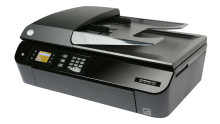
The HP Officejet 4630 is an all-in-one inkjet printer designed for home and small office use. It offers basic printing, scanning, copying, and faxing capabilities, with a maximum print resolution of 4800x1200 dpi for color prints. It features a 35-page automatic document feeder, which can help speed up scanning or copying multiple-page documents. The printer also supports wireless connectivity, including Wi-Fi and mobile printing through HP ePrint and Apple AirPrint. While it lacks advanced features, such as automatic duplexing or high-yield ink cartridges, the HP Officejet 4630 can still be a decent choice for those with moderate printing needs and a limited budget.
HP Officejet 4630 e-All-in-One Printer series Full Feature Software and Drivers
File: Full_Webpack-116_1-Full_Webpack.exe
fc6f0d4699f0b316e8c85b198eee0b78509caceffc37905978f93a0aadd4bfc1
HP Officejet 4630 e-All-in-One Printer series Basic Driver
File: Basic_Webpack_x64-116-Basic_Webpack_x64.exe
78bc2792e25f489cb6f2789a62892d73d34544c2654a6b5ee4e9ae5e4f201c95
HP Officejet 4630 e-All-in-One Printer series Basic Driver
File: Basic_Webpack_x86-116-Basic_Webpack_x86.exe
1c5abfeee8d6c73e4bbc90d4b8bb9bae53a942fd8f74b2f01da43b771566579f
What Ink Cartridges does the HP Officejet 4630 use?
HP 61 Black Original Ink Cartridge ~170 pages
HP 61 Tri-color Original Ink Cartridge ~150 pages
HP 61XL High Yield Black Original Ink Cartridge ~430 pages
HP 61XL High Yield Tri-color Original Ink Cartridge ~300 pages
HP 61 2-pack Black/Tri-color Original Ink Cartridges ~150 pages



