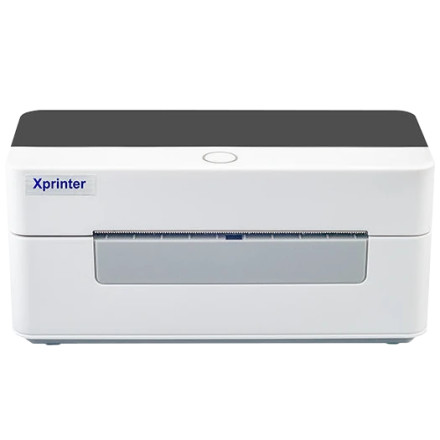
🧱 Device
🏗️ Manufacturer
#️⃣ Model No.
XP-D463B
🛜 Network Technology
Interface/port(s)
How to Install Xprinter XP-D463B
- Download the XPrinter Driver Setup V8.2.exe file to your computer.
- Right-click the file and select Run as administrator to launch the installer.
- Follow the on-screen prompts, accept the license agreement, and choose the installation options. Connect and power on your XPrinter when prompted, or after the installation completes if instructed.
- Click Finish when the installation is complete, then restart your computer if prompted.
- Open Settings > Printers & scanners (or Devices and Printers on older versions of Windows), confirm the XPrinter is listed, and print a test page to verify the installation was successful.
Xprinter Driver 58/76/80/90mm
File: XPrinter Driver Setup V8.2.exe
SHA-256 Checksum:
a84e7cea4fdca8370a7a3d4c858970eb7ac368602b184de8fe06abfb4c653d78
Xprinter Driver 58/76/80/90mm
File: XPrinter Driver V8.0.exe
SHA-256 Checksum:
0bfc7050e69aa27231086d7e2618f74dee1402a4501812ecc4de93310dc8826e
Xprinter Driver 58/76/80/90mm
File: XPrinter Driver Setup V7.77.exe
Xprinter Driver 58/76/80/90mm
File: Mac Driver.zip
SHA-256 Checksum:
3826b0e770672cba4fc68147e24440117d98c0b673e2d9632dc668cf5dc64c06
Xprinter Driver 58/76/80/90mm
File: Mac Driver.zip
Xprinter Print Service
File: Xprinter print service_1.4_new.apk
SHA-256 Checksum:
4c9392e06a97abf9f2aa765ebe08d7e65f72c0568bf84ac243dc7ffff06ea554
Xprinter Driver
File: Xprinter_2022.2.exe
SHA-256 Checksum:
284cc380c5d521bf94bc2ab60859edff07ededfe873ca7109aa8d169caf2efca



