🧱 Device
🏗️ Manufacturer
#️⃣ Model No.
XP-K200L
Interface/port(s)
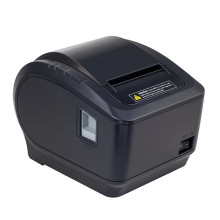
On this page we have the drivers needed for the XPRINTER XP-K200L (also know as XP-K200) Label Printer for Windows 11, 10, 8.1 , 8, 7, Vista and XP. For the latest drivers you can always visit the official xprinter website, though it can be a little confusing as to finding the drivers due to the layout.
Xprinter Driver 58/76/80/90mm
File: XPrinter Driver Setup V8.2.exe
SHA-256 Checksum:
a84e7cea4fdca8370a7a3d4c858970eb7ac368602b184de8fe06abfb4c653d78
Xprinter Driver 58/76/80/90mm
File: XPrinter Driver V8.0.exe
SHA-256 Checksum:
0bfc7050e69aa27231086d7e2618f74dee1402a4501812ecc4de93310dc8826e
Xprinter Driver 58/76/80/90mm
File: XPrinter Driver Setup V7.77.exe
Xprinter Driver 58/76/80/90mm
File: Mac Driver.zip
SHA-256 Checksum:
3826b0e770672cba4fc68147e24440117d98c0b673e2d9632dc668cf5dc64c06
Xprinter Driver 58/76/80/90mm
File: Mac Driver.zip
Xprinter Print Service
File: Xprinter print service_1.4_new.apk
SHA-256 Checksum:
4c9392e06a97abf9f2aa765ebe08d7e65f72c0568bf84ac243dc7ffff06ea554
Xprinter Driver
File: Xprinter_2022.2.exe
SHA-256 Checksum:
284cc380c5d521bf94bc2ab60859edff07ededfe873ca7109aa8d169caf2efca
- Model: XP-K200L
- Print width: 72mm (adjustable by commands)
- Column Capacity : 576 dots / line or 512 dots / linePrinting speed : 200mm / s
- Interface : USB + LAN
- Printing paper : 79.5 ± 0.5mm
- Line spacing: 3.75mm (Adjustable by commands)
- Weight: 2 Kg
- Dimensions: 195 × 140 × 138mm (D × W × H)



