Pairing with Two Devices
1. Power on the headset to enter pairing mode. Activate Bluetooth on your first device, search for "TK-HS012", and click to connect. 2. Once successfully connected, turn off Bluetooth on the first device. The headset will re-enter pairing mode. Now, activate Bluetooth on your second device, search for "TK-HS012", and click to connect.
3. Reactivate Bluetooth on the first device and click on "TK-HS012" to reconnect. Now the headset is connected with two devices.
Note: Only one device can stream audio at a time. If you wish to play music from the second device, ensure that playback on the first device is stopped. The same applies when making calls.
Operation Instructions
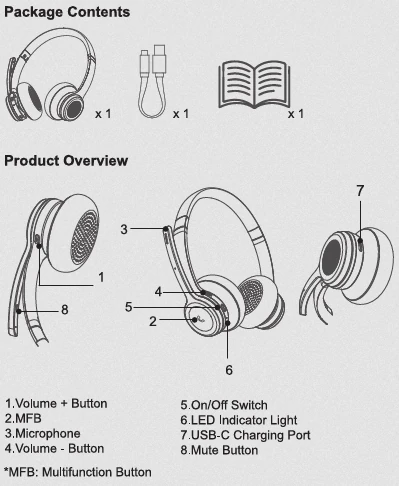
Toggle the switch to the ON position. The headset automatically enters pairing mode when turned on and there is no previous connection history.
Power on
On/Off Switch
Power off
Toggle the switch to the OFF position.
Answer a call Short press the MFB to answer an incoming call.
MFB
Hang up a call Short press the MFB to hang up a call.
Reject a call
Press and hold the MFB for 1-2 seconds to reject an incoming call.
Button
MFB
Function
Redial the last call
Audio switching
Call Waiting
Voice assistant
Operation Instructions
Double press the MFB to redial the most recent call on your cell phone.
During a call, press and hold the MFB for 1-2
seconds to switch between the headset and the phone speaker.
To answer a new call and hang up the current call, short press the MFB.
To answer a new call and keep the current call, double press the MFB.
To keep the current call and reject the new call, press and hold the MFB for 1-2 seconds.
To alternate between the current call and the kept call, double press the MFB.
Press and hold the MFB for 3 seconds to activate the voice assistant on your phone. (Only in the non-calling state)
Play/Pause Press the MFB once to play or pause music.
EQ mode
Volume up
While playing music, press the MFB three times to cycle through three EQ effects: Pop Mode, Vocal Mode, and Bass Mode.
Press the Volume + button. (When the volume reaches the top level, you will hear an alert.)
Volume +
Next track
Press and hold Volume + for 1-2 seconds.
3. What is the password for pairing?
If the device prompts for a password/PIN, try entering one of the following: 0000, 8888, 1111, or 1234. Note: Most devices will not require you to enter a password.
4. What devices can be used to charge the headset? The headset can be charged using car chargers, travel chargers, computer USB ports, etc., provided that the DC voltage is 5V and the current exceeds 500mA.
5. What should I do if I encounter issues such as the headset not turning on or failing to connect?
You can try resetting the headset by plugging in the charging cable to charge it. After it turns off, restart it and see if it
operates normally. If problems persist, please reach out to our customer service for technical support.
6. When will the headset automatically shut down? The headset will automatically shut down if it remains unconnected for more than 10 minutes or when the battery level is low.
7. Can I use the headset while it's charging?



