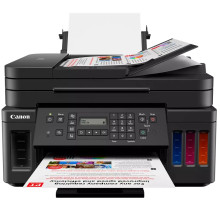
The Canon PIXMA G7040 Printer is a high-performance ink tank printer designed for productivity and efficiency. Featuring an integrated ink tank system, it minimizes the need for frequent cartridge changes, ensuring cost-effective printing. This all-in-one printer excels in producing sharp documents and vibrant photos. The Canon PIXMA G7040 Printer Drivers are essential software components for seamless integration with the operating system. These drivers enable effective communication between the printer and the computer, ensuring optimal functionality. Supporting various operating systems, the Canon PIXMA G7040, along with its dedicated drivers, provides a reliable and efficient solution for users requiring cost-conscious and high-quality printing.
Print Driver and Scan Utility Installer
File: md__-win-g7000-1_00-ea34_2.exe
6a5f52240616d5eff4cf93c1b872d62c860f7b2d6efd136efb4f6bf236ca8342
Canon G7000 series Driver setup package
File: win-g7000-1_3-n_mcd.exe
6ec4713fe7d6f8d388106604c2088fee73edfc6ff26da90bbc0bf5ffe6c73ff9
Canon G7000 Series Driver setup package
File: mac-g7000-1_1-mcd.dmg
684eec050db3f88666212f48efe69d92fd9e5bf664ea4eb61edcc295d0f3449c
Canon G7000 Series User Manual
File: G7000ser_OnlineManual_Win_EN_V01.pdf
c35623fd7765f8eeae7dfef19dd0ff12e4d87547eafb15883f7f9dee88643666
What ink does the PIXMA G7040 use?
- GI-20 Pigment-Based Black Ink Bottle
- GI-20 Dye-Based Color Inks (Cyan, Magenta, Yellow)



