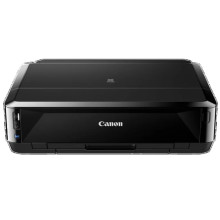
🧱 Device
Series
🏗️ Manufacturer
#️⃣ Model No.
iP7250
🛜 Network Technology
Interface/port(s)
Operating System(s)
Drivers for the Canon PIXMA iP7250 can be downloaded below for Windows and macOS for nearly every version since the year 2000.
Canon iP7200 Series Printer Driver
File: p86l-win-ip7200-1_01-ea32_2.exe
SHA-256 Checksum:
3ba58059ca15160e2aa6c945e0b312694c9c6480521c641db876b7148e2ac22c
Canon iP7200 series XPS Printer Driver
File: xp68-win-ip7200-5_60a-ea32_2.exe
SHA-256 Checksum:
9e6299f7d8974fb68780cc5ffd665b366f20f899ad297bd06b63ea6d8ce04ff7
Canon iP7200 series CUPS Printer Driver
File: mcpd-mac-ip7200-16_90_0_0-ea21_3.dmg
SHA-256 Checksum:
c7c736e2cd70b50f117509805f37494d8ca72debd90b9e208547920a023b4e77
Canon iP7200 series CUPS Printer
File: mcpd-mac-ip7200-16_40_1_0-ea21_3.dmg
SHA-256 Checksum:
7e3e0e53101a39da20c430a62307ff1a2457206fa50988a4f303df0d829ac8bb
➕ Additional Drivers:
What ink does the Canon PIXMA iP7250 use?
Standard Ink Cartridges
- PGI-550PGBK (Pigment Black)
- CLI-551BK (Black)
- CLI-551C (Cyan)
- CLI-551M (Magenta)
- CLI-551Y (Yellow)
High yield XL ink tanks
- PGI-550PGBK XL (Pigment Black)
- CLI-551BK XL (Black)
- CLI-551C XL (Cyan)
- CLI-551M XL (Magenta)
- CLI-551Y XL (Yellow)



