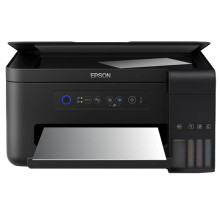
The Epson EcoTank L4150 All-in-One Printer revolutionized printing with its innovative EcoTank system, featuring large, refillable ink tanks that minimized cartridge replacements and reduced printing costs. Delivering exceptional quality prints with its PrecisionCore printhead and high-resolution output, it suited both home and office environments. Its multifunctional capabilities encompassed printing, scanning, and copying, catering to diverse needs. The printer drivers provided seamless integration with various operating systems, ensuring smooth performance and optimal functionality. With wireless connectivity options, including Wi-Fi and Wi-Fi Direct, it offered flexible printing from multiple devices. The Epson EcoTank L4150 and its drivers epitomized efficiency, affordability, and convenience in printing technology.
Printer Driver
File: L4150_X64_27001_LA.exe
76e4417b100451f0fd2ae38f6766432a48064a1fb41e1a520e5003c8a0a988a5
Printer Driver
File: L4150_X86_27001_LA.exe
80d924a1f9a811e6e2478d5c0862623b5b0e3ce0f66baf1a50c1c1d876e352c3
Scanner Driver and Epson Scan 2 Utility
File: L4150_EScan2_65230_LA.exe
272825a25842da030e957fbcbee126392faf6631443721d538317a4509679a11
Printer Driver
File: L4150_X86_27001_LA.exe
4230b904269c5ca5fca999ee766d5802220f2beab60877c460cb006ef4659809
Scanner Driver and Epson Scan 2 Utility
File: L4150_EScan2_64143_LA.dmg
17cfca7a8a5b85037536fa3393f1af2b6757147e2d39cfeb331fdf237483f845
What ink does the Epson EcoTank L4150 use?
Epson T504, Black Ink Bottle T504120-AL
Epson T504, Cyan Ink Bottle T504220-AL
Epson T504, Magenta Ink Bottle T504320-AL
Epson T504, Yellow Ink Bottle T504420-AL



