
Accessing the BIOS (or UEFI) lets you change important system settings like boot order, hardware configuration, and security options. This guide works for both Windows 11 and Windows 10 systems.
✅ Method 1: Use a BIOS Key During Startup (Most Common)
Steps:
- Turn off your computer completely
- Turn it back on
- Immediately press the BIOS key repeatedly
Common BIOS Keys:
- F2 → ASUS, Acer, Dell
- Del → Desktop motherboards (MSI, Gigabyte)
- F10 → HP
- Esc → HP (startup menu, then BIOS)
- F1 → Lenovo
👉 You must press the key right after powering on, before Windows starts.
⚙️ Method 2: Enter BIOS from Windows Settings
If your PC boots too fast, use this method:
Steps:
- Open Settings
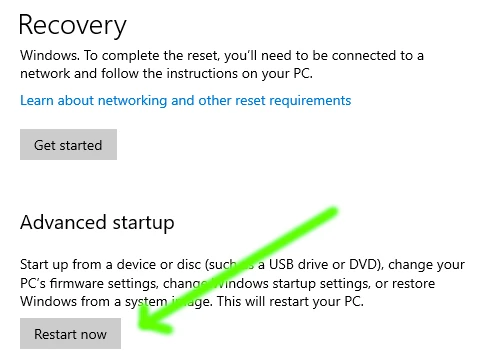
- Go to System → Recovery
- Under Advanced startup, click Restart now
- Select:
- Troubleshoot → Advanced options → UEFI Firmware Settings
- Click Restart
👉 Your PC will boot directly into BIOS/UEFI.
Image
💻 Method 3: Use Shift + Restart Shortcut
- Click Start → Power
- Hold Shift and click Restart
- Follow:
- Troubleshoot → Advanced options → UEFI Firmware Settings
⚠️ If You Can’t Access BIOS
Try these fixes:
- Disable Fast Startup in Windows
- Use a wired keyboard (USB may initialize late)
- Try a different key (varies by manufacturer)
- Check your PC/motherboard manual
🧠 What You Can Do in BIOS
- Change boot order (USB, SSD, HDD)
- Enable/disable Secure Boot
- Turn on virtualization (for VMs)
- Adjust hardware settings
🚀 Pro Tips
- Don’t change settings unless you understand them
- Always save before exiting (usually F10)
- Take photos of original settings before making changes
👍 Quick Summary
- Press F2 / Del / F10 / Esc at startup
- Or use Windows Advanced Startup → UEFI Firmware Settings
- Restart → BIOS opens
🎯 Final Thoughts
Getting into BIOS is simple once you know the correct key or method. If your system boots too quickly, the Windows recovery method is the most reliable way to access it without timing key presses.
Force Cache (Faster Mirror)



