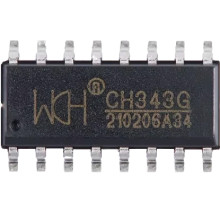
🧱 Device
🏗️ Manufacturer
#️⃣ Model No.
CH343
CPU/Chipset(s)
Interface/port(s)
Port(s)
The WCH CH343 USB to Serial Driver enables Windows 11 and Windows 10 systems to communicate with devices using the WCH CH343 USB-to-UART bridge. It creates a virtual COM port for serial communication with microcontrollers, industrial equipment, development boards, GPS receivers, and other serial devices. Installing the latest driver ensures stable connectivity, proper device recognition, improved compatibility, and reliable data transfer for applications requiring USB-to-serial communication.
Quick Install
- Download the CH343SER.EXE driver package.
- Double-click CH343SER.EXE and select Install.
- Wait for the installation to complete successfully.
- Connect the CH343 USB-to-Serial device to your computer.
- Open Device Manager and verify that a new COM port appears under Ports (COM & LPT).
WCH CH343 USB to Serial Driver
File: CH343SER.EXE
SHA-256 Checksum:
99f16f9c4cf9c315dc9a17b29021d82d522014ecc053d9ee1c7b38c214dea40b