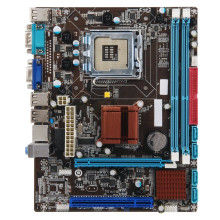
Drivers for the Esonic G41 series can be downloaded below for all Windows operating systems from Windows 10 to Windows 7. These drivers are required to get the onboard Sound and Networking operational in Windows. The G41 series of motherboards didn’t have TPM 2.0 built in so if you are trying to install Windows 11 you will have to use this guide to bypass this requirement: How to [Guide] Installing Windows 11 on a computer that doesn't meet the requirements.
Intel Graphics Driver
File: VGA-WIN7 10_64bit.zip
7df3bcc293fd329d6437cd71a28631582cc599e3f3bde7f0aff85f1498fc908c
Intel Graphics Driver
File: VGA-WIN7 10_32bit.zip
ca0fee12363f704f4352389773d450d07b06ba9427cd304b9f39dcdc99677dc5
Intel Chipset Driver
File: INF_allOS_9.2.0.1021_PV.exe
ec506901680f871e6fb6492776df6ae2154d346febc4580a90bb449cecfbcd08
Realtek HD Sound Driver
File: 0009-64bit_Win7_Win8_Win81_Win10_R282.exe
09784ab2bdfe97eeb085985b0c8a9e9727e882450b7918990b057b62612b967b
Realtek HD Sound Driver
File: 0009-32bit_Win7_Win8_Win81_Win10_R282.exe
4dbeb838b2e6650d0b57f0db6eabe0dd8445a144dc64e3b38e3df39be1d41dad
Realtek PCIe GBE Family Controller Driver
File: LAN-WIN10_32 64bit.zip
4a77d72e70e753c3a4af619770dd49c63d14af4f5ce8d95647ac2fa5ac4aae67
Realtek PCIe GBE Family Controller Driver
File: LAN-WIN7_32 64bit.zip
628e962968b862cbc5c8c742ba7fb713aa9710852771e4dd0de7a901dbf0192b



