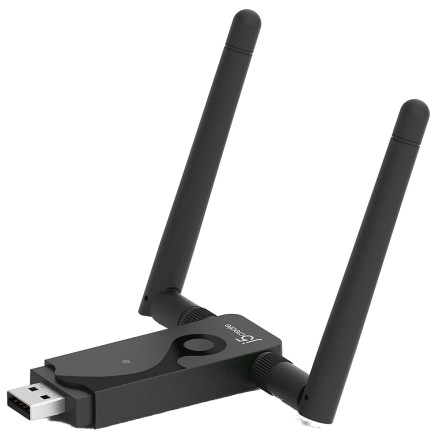
🧱 Device
🏗️ Manufacturer
#️⃣ Model No.
JUE302
CPU/Chipset(s)
🛜 Network Technology
Interface/port(s)
ASIN
B00UGHCXQQ
Operating System(s)
The j5create JUE302 Wireless N300 Dual Band USB Adapter uses a MediaTek/Ralink wireless chipset to provide Wi-Fi connectivity through USB. The driver packages below provide support for compatible Windows and macOS systems.
Available Drivers
Windows Driver
- File:
j5UsbWirelessN150Adapter-v1.5.39.173-1.5.28.0-win.zip - Extract the ZIP archive before installation.
macOS Driver
- File:
j5UsbWirelessN300Adapter-v4.0.9.6-mac.zip - Extract the archive and follow the included macOS installation instructions.
Windows Installation
- Download the Windows ZIP package.
- Extract its contents using Windows or 7-Zip.
- There are two packages inside depending o your operating system.
j5UsbWirelessN150Adapter-v1.5.39.173-1.5.28.0-win10_8.1.exefor Windows 11/10 & 8.1j5UsbWirelessN150Adapter-v1.5.28.0-win8_7_vista_xp.exefor Windows 8/7/Vista & XP
- Connect the JUE302 adapter to a USB port.
- Run the driver setup program from the extracted folder.
- Follow the installation instructions and restart Windows if prompted.
macOS Installation
- Download the macOS ZIP package.
- Extract the archive.
- Open the extracted folder and run the included installer.
- Follow the installation instructions.
- If macOS requests permission for the system extension or network component, review the prompt and allow it if appropriate for your macOS version.
Note: The supplied Windows package is named for the N150 adapter, while the macOS package specifically identifies the N300 adapter. Confirm compatibility with the JUE302 hardware revision before installation. Newer macOS releases may also require additional security or privacy permissions.
j5create JUE301/JUE302 Network Driver
File: j5UsbWirelessN150Adapter-v1.5.39.173-1.5.28.0-win.zip
SHA-256 Checksum:
0e16a0c7bc59052389949549332b621ff8549a8f55c22065c327dc376397f907
j5create JUE301/JUE302 Network Driver
File: j5UsbWirelessN300Adapter-v4.0.9.6-mac.zip
SHA-256 Checksum:
685deecb092112e049a26381c70c8a58622d7bc9ffb2fef2023e049c0f7e6c15



