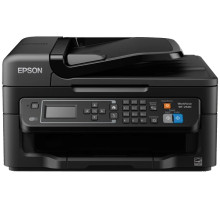
Device
Series
Manufacturer
Model No.
C11CE36201
Also Known As
WorkForce WF-2630 All-in-One Printer
Network Technology
Interface/port(s)
Operating System(s)
Drivers for the Epson WF-2630 can be downloaded below. The drivers are the Epson Official drivers linked from their servers. Drivers for Windows 11, 10, 8.1, 8, 7 and OS going back to Windows XP are compatible. Also, macOS systems from macOS 15 to 10.6 are compatible. Simply download the driver for your system then run the file as a administrator or superuser to begin installation.
Epson Printer Driver
File: WF2630_X64_24003_NA.exe
SHA-256:
816ebf3560642a632abcdb557abda6eef3492ab272b55a61bafc04f89c87d24e
Epson Printer Driver
File: WF2630_X86_24003_NA.exe
SHA-256:
c4825615b7d206dc38e536dc4c3991e34fcdfedf748982af557512ddd82abf82
Epson Scanner Driver and EPSON Scan Utility
File: WF2630_EScan_5225_NA.exe
SHA-256:
6557ad4393fe27d95b34c738f24b0785e24aa6019aef3beb85da8b167ad49559
Epson Printer Driver
File: BIJP_1262_2_NA.dmg
SHA-256:
b4c90e6f5fb106d298dbf793ecf3986525792905f5fb18ff72a4c7448f2e91e5
Epson WorkForce WF-2630 Scanner Driver and Epson Scan 2 Utility
File: WF2630_EScan2_64143_NA.dmg
SHA-256:
8fbde2f618bc7aa98c2e90eb18a0ea4f9e4c05157f54a6d6135933536e41f3a3
What ink does the WorkForce WF-2630 use:
- Standard-Capacity Black (T220120)
- Standard-capacity Cyan (T220220)
- Standard-capacity Magenta (T220320)
- Standard-capacity Yellow (T220420)
- High-capacity Black (T220XL120)
- High-capacity Cyan (T220XL220)
- High-capacity Magenta (T220XL320)
- High-capacity Yellow (T220XL420)



