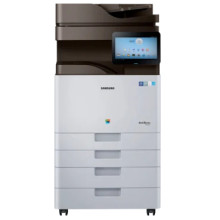
The Samsung MultiXpress SL-X4250 Printer embodies versatility and efficiency for demanding office environments. Offering printing, scanning, copying, and optional faxing capabilities, it excels with a 10.1-inch touchscreen for intuitive navigation and access to various functions. Speeds of up to 25 pages per minute ensure swift output, while versatile paper handling accommodates diverse needs. Its advanced connectivity options, including wireless and NFC, support seamless integration with modern workflows and mobile printing solutions. Enhanced security features safeguard sensitive data, and eco-friendly elements promote sustainability. The SL-X4250 emerges as a robust, feature-rich multifunctional printer, catering to the diverse needs of medium to large-scale offices.
Samsung SL-X4220,4250,4300 Series Scan Driver
File: X4300_Series_WIN_Scanner_V3.32.12_CDV1.39.exe
304491200b9da426543172d594d07214e33369ef8aae843236891f5b725258fb
Samsung SL-X4220, 4250, 4300 Series Print Driver(No Installer)
File: X4300_Series_WIN_Printer_V3.13.14.08.37_CDV1.39.zip
12daa1b4a0b84c420fe70f71865d85aa48b5bb686384114d46733a2a550bfb2c
Samsung SL-X4220, X4250, X4300 Series Print Driver PCL6
File: X4300_Series_WIN_PCL_V3.13.14.08.37_CDV1.39.exe
2f1495ceaeb182f8b27bf7937f44e900750807129cfefeaea506f49eb6fc5f86
What toner does the Samsung MultiXpress SL-X4250 use?
- Samsung CLTK808S - Black Toner genuine Black Toner ~23,000 pages
- Samsung CLTC808S Cyan Toner Cartridge ~ 20,000 pages
- Samsung CLTM808S Magenta Toner Cartridge ~ 20,000 pages
- Samsung CLTY808S Yellow Toner Cartridge ~ 20,000 pages



